 81c170a696
This option was added in 9672afa339 in 2016,
at which time tweaking GOGC showed a significant difference when building
the binary (`1m14.221s` vs `0m49.929s`).

Testing this Today doesn't show a real difference;

With GOGC=1000:

    rm -rf bundles/
    time hack/make.sh binary
    real	0m15.303s
    user	0m26.285s
    sys	0m6.383s

    real	0m4.931s
    user	0m3.103s
    sys	0m1.670s

    real	0m5.693s
    user	0m3.827s
    sys	0m2.384s

Without GOGC set;

    real	0m5.012s
    user	0m3.689s
    sys	0m1.549s

    real	0m5.298s
    user	0m3.997s
    sys	0m1.695s

    real	0m4.899s
    user	0m3.579s
    sys	0m1.423s

Signed-off-by: Sebastiaan van Stijn <github@gone.nl>
13 KiB
Work with a development container
In this section, you learn to develop like the Moby Engine core team.
The moby/moby repository includes a Dockerfile at its root. This file defines
Moby's development environment. The Dockerfile lists the environment's
dependencies: system libraries and binaries, Go environment, Go dependencies,
etc.
Moby's development environment is itself, ultimately a Docker container.
You use the moby/moby repository and its Dockerfile to create a Docker image,
run a Docker container, and develop code in the container.
If you followed the procedures that set up Git for contributing, you should have a fork of the moby/moby
repository. You also created a branch called dry-run-test. In this section,
you continue working with your fork on this branch.
Task 1. Remove images and containers
Moby developers run the latest stable release of the Docker software. They clean their local hosts of unnecessary Docker artifacts such as stopped containers or unused images. Cleaning unnecessary artifacts isn't strictly necessary, but it is good practice, so it is included here.
To remove unnecessary artifacts:
-
Verify that you have no unnecessary containers running on your host.
$ docker ps -aYou should see something similar to the following:
CONTAINER ID IMAGE COMMAND CREATED STATUS PORTS NAMESThere are no running or stopped containers on this host. A fast way to remove old containers is the following:
You can now use the
docker system prunecommand to achieve this:$ docker system prune -aOlder versions of the Docker Engine should reference the command below:
$ docker rm $(docker ps -a -q)This command uses
docker psto list all containers (-aflag) by numeric IDs (-qflag). Then, thedocker rmcommand removes the resulting list. If you have running but unused containers, stop and then remove them with thedocker stopanddocker rmcommands. -
Verify that your host has no dangling images.
$ docker imagesYou should see something similar to the following:
REPOSITORY TAG IMAGE ID CREATED SIZEThis host has no images. You may have one or more dangling images. A dangling image is not used by a running container and is not an ancestor of another image on your system. A fast way to remove dangling image is the following:
$ docker rmi -f $(docker images -q -a -f dangling=true)This command uses
docker imagesto list all images (-aflag) by numeric IDs (-qflag) and filter them to find dangling images (-f dangling=true). Then, thedocker rmicommand forcibly (-fflag) removes the resulting list. If you get a "docker: "rmi" requires a minimum of 1 argument." message, that means there were no dangling images. To remove just one image, use thedocker rmi IDcommand.
Task 2. Start a development container
If you followed the last procedure, your host is clean of unnecessary images and containers. In this section, you build an image from the Engine development environment and run it in the container. Both steps are automated for you by the Makefile in the Engine code repository. The first time you build an image, it can take over 15 minutes to complete.
-
Open a terminal.
For Docker Toolbox users, use
docker-machine status your_vm_nameto make sure your VM is running. You may need to runeval "$(docker-machine env your_vm_name)"to initialize your shell environment. If you use Docker for Mac or Docker for Windows, you do not need to use Docker Machine. -
Change into the root of the
moby-forkrepository.$ cd ~/repos/moby-forkIf you are following along with this guide, you created a
dry-run-testbranch when you set up Git for contributing. -
Ensure you are on your
dry-run-testbranch.$ git checkout dry-run-testIf you get a message that the branch doesn't exist, add the
-bflag (git checkout -b dry-run-test) so the command both creates the branch and checks it out. -
Use
maketo build a development environment image and run it in a container.$ make shellUsing the instructions in the
Dockerfile, the build may need to download and / or configure source and other images. On first build this process may take between 5 - 15 minutes to create an image. The command returns informational messages as it runs. A successful build returns a final message and opens a Bash shell into the container.Successfully built 3d872560918e docker run --rm -i --privileged -e BUILDFLAGS -e KEEPBUNDLE -e DOCKER_CLIENTONLY -e DOCKER_DEBUG -e DOCKER_EXPERIMENTAL -e DOCKER_GITCOMMIT -e DOCKER_GRAPHDRIVER=vfs -e DOCKER_REMAP_ROOT -e DOCKER_STORAGE_OPTS -e DOCKER_USERLANDPROXY -e TESTDIRS -e TESTFLAGS -e TIMEOUT -v "home/ubuntu/repos/docker/bundles:/go/src/github.com/docker/docker/bundles" -t "docker-dev" bash #At this point, your prompt reflects the container's BASH shell.
Alternatively you can use the provided devcontainer in an IDE that supports them (VSCode, Goland, etc.)
Note: The
make shellcommand creates an image tagged asdocker-dev:latestby default. It does not automatically tag the image with your current branch name, even if you are on a feature branch. Some older documentation or examples may refer to a branch-specific tag, but that behavior is no longer used.
-
List the contents of the current directory (
/go/src/github.com/docker/docker).You should see the image's source from the
/go/src/github.com/docker/dockerdirectory.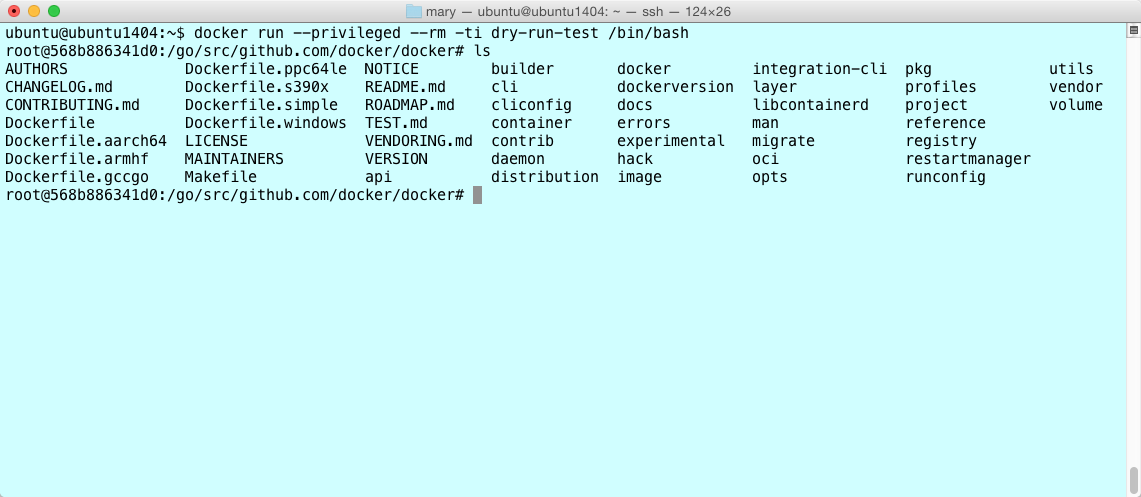
-
Make a
dockerdbinary.# hack/make.sh binary Removing bundles/ ---> Making bundle: binary (in bundles/binary) Building bundles/binary-daemon/dockerd (linux/amd64)... Created binary: bundles/binary-daemon/dockerd Building bundles/binary-daemon/docker-proxy (linux/amd64)... Created binary:bundles/binary-daemon/docker-proxy -
Run
make install, which copies the binary to the container's/usr/local/bin/directory.# make install -
Start the Engine daemon running in the background.
# dockerd -D &
...output snipped...
DEBU[0001] Registering POST, /networks/{id:.*}/connect
DEBU[0001] Registering POST, /networks/{id:.*}/disconnect
DEBU[0001] Registering DELETE, /networks/{id:.*}
INFO[0001] API listen on /var/run/docker.sock
DEBU[0003] containerd connection state change: READY
The
-Dflag starts the daemon in debug mode. The&starts it as a background process. You'll find these options useful when debugging code development. You will need to hitreturnin order to get back to your shell prompt.Note
: The following command automates the
build,install, andrunsteps above. Once the command below completes, hitctrl-zto suspend the process, then runbg 1and hitenterto resume the daemon process in the background and get back to your shell prompt.hack/make.sh binary install-binary run -
Inside your container, check your Docker versions:
# docker version
Client:
 Version:      17.06.0-ce
 API version:  1.30
 Go version:   go1.8.3
 Git commit:   02c1d87
 Built:        Fri Jun 23 21:15:15 2017
 OS/Arch:      linux/amd64

Server:
 Version:      dev
 API version:  1.35 (minimum version 1.12)
 Go version:   go1.9.2
 Git commit:   4aa6362da
 Built:        Sat Dec  2 05:22:42 2017
 OS/Arch:      linux/amd64
 Experimental: false
Notice the split versions between client and server, which might be unexpected. In more recent times the Docker CLI component (which provides the
dockercommand) has split out from the Moby project and is now maintained in docker/cli.The Moby project now defaults to a fixed version of the
dockerCLI for integration tests.You may have noticed the following message when starting the container with the
shellcommand:Makefile:123: The docker client CLI has moved to github.com/docker/cli. For a dev-test cycle involving the CLI, run: DOCKER_CLI_PATH=/host/path/to/cli/binary make shell then change the cli and compile into a binary at the same location.By setting
DOCKER_CLI_PATHyou can supply a newerdockerCLI to the server development container for testing and forintegration-clitest-execution:make DOCKER_CLI_PATH=~/go/src/github.com/docker/cli/build/docker shell ... # which docker /usr/local/cli/docker # docker --version Docker version 29.0.0-dev, build 09cd4ea26cThis Docker CLI should be built from the docker-cli project and needs to be a Linux binary.
Inside the container you are running a development version. This is the version on the current branch. It reflects the value of the
VERSIONfile at the root of yourdocker-forkrepository. -
Run the
hello-worldimage.# docker run hello-world -
List the image you just downloaded.
# docker images REPOSITORY TAG IMAGE ID CREATED SIZE hello-world latest c54a2cc56cbb 3 months ago 1.85 kB -
Open another terminal on your local host.
-
List the container running your development container.
ubuntu@ubuntu1404:~$ docker ps
CONTAINER ID   IMAGE        COMMAND            CREATED          STATUS          PORTS     NAMES
a8b2885ab900   docker-dev   "hack/dind bash"   43 minutes ago   Up 43 minutes             hungry_payne

Task 3. Make a code change
At this point, you have experienced the "Moby inception" technique. That is, you have:
- forked and cloned the Moby Engine code repository
- created a feature branch for development
- created and started an Engine development container from your branch
- built a binary inside your development container
- launched a
dockerdaemon using your newly compiled binary - called the
dockerclient to run ahello-worldcontainer inside your development container
Running the make shell command mounted your local Docker repository source into
your Docker container.
When you start to develop code though, you'll want to iterate code changes and builds inside the container. If you have followed this guide exactly, you have a bash shell running a development container.
Try a simple code change and see it reflected in your container. For this
example, you'll edit the help for the attach subcommand.
-
If you don't have one, open a terminal in your local host.
-
Make sure you are in your
moby-forkrepository.$ pwd /Users/mary/go/src/github.com/moxiegirl/moby-forkYour location should be different because, at least, your username is different.
-
Open the
daemon/command/docker.gofile. -
Edit the command's help message.
For example, you can edit this line:
Short: "A self-sufficient runtime for containers.",And change it to this:
Short: "A self-sufficient and really fun runtime for containers.", -
Save and close the
daemon/command/docker.gofile. -
Go to your running docker development container shell.
-
Rebuild the binary by using the command
hack/make.sh binaryin the docker development container shell. -
Stop Docker if it is running.
-
Copy the binaries to /usr/local/bin by entering the following commands in the docker development container shell.
hack/make.sh binary install-binary -
To view your change, run the
dockerd --helpcommand in the docker development container shell.
# dockerd --help

Usage:        dockerd COMMAND

A self-sufficient and really fun runtime for containers.

Options:
...
You've just done the basic workflow for changing the Engine code base. You made your code changes in your feature branch. Then, you updated the binary in your development container and tried your change out. If you were making a bigger change, you might repeat or iterate through this flow several times.
Where to go next
Congratulations, you have successfully achieved Docker inception. You've had a small experience of the development process. You've set up your development environment and verified almost all the essential processes you need to contribute. Of course, before you start contributing, you'll need to learn one more piece of the development process, the test framework.